
To calculate the distance between ZIP Codes in Excel, match each GeoPostcodes’ provided ZIP Code to its latitude and longitude coordinates, convert those values to radians, and apply the Haversine formula to measure straight-line distance.
Key takeaways
- ZIP Code distance in Excel is calculated using the Haversine formula, which measures straight-line (“as-the-crow-flies”) distance between coordinates.
- You need a ZIP Code database with accurate latitude and longitude values, such as data from GeoPostcodes.
- Latitude and longitude values must be converted from degrees to radians before applying the formula.
- Results represent straight-line distance, not driving or travel routes, and can be expressed in kilometers or miles.
- Accuracy depends heavily on up-to-date ZIP Code centroid data, especially for large or rural ZIP Codes.
Introduction
How to Calculate Distance Between ZIP Codes in Excel provides step-by-step guidance on computing straight-line distances using coordinate data and the Haversine formula. In this article, we outline the inputs, method, and output you need to perform accurate distance calculations in Excel, why this method measures straight-line distance rather than driving distance, and best practices for ensuring reliable results.
💡 Browse GeoPostcodes’ ZIP Code database, built from over 1,500 authoritative sources. Enhance your distance calculations and logistics analysis with highly accurate, ZIP-Code-level geographic coordinates. You can download a free sample here.
Distance calculation overview
- Method: Haversine (great-circle) formula
- Inputs: Latitude & longitude per ZIP
- Tool: Microsoft Excel
- Output: Straight-line distance (miles or km)
Before you begin
Before diving into calculations, we need to gather the tools mentioned above, essentially:
- A database containing ZIP Codes with their corresponding latitude and longitude coordinates. In our example, we’ll be using the ZIP Code Lookup tool.
- Excel (or Google Sheets) is our calculation engine.
- The Haversine formula implementation acts as your distance-measuring algorithm.
How the distance between ZIP Codes works
Understanding the Haversine Formula
The Haversine formula in Excel calculates the shortest distance between two points, taking into account Earth’s curvature to provide accurate “as the crow flies” distances:
=ACOS(SIN(lat1)*SIN(lat2)+COS(lat1)*COS(lat2)*COS(lon2-lon1))*6371
Formula Breakdown:
- lat1, lon1 = Coordinates of your first ZIP Code (in radians)
- lat2, lon2 = Coordinates of your second ZIP Code (in radians)
- 6371 = Earth’s radius in kilometers (use 3959 for miles)
Why straight-line distance vs driving distance
Distance calculations in Excel typically measure straight-line distance rather than driving distance. This is because formulas like the Haversine formula calculate the shortest path between two geographic points on the Earth’s surface, without accounting for roads, traffic, or routing constraints.
Straight-line distance measures the shortest path between two geographic points on the Earth’s surface using latitude and longitude coordinates.
This method follows a great-circle path and does not account for roads, terrain, or routing constraints. Straight-line distance is commonly used for large-scale analysis, proximity comparisons, and ranking locations because it is consistent, reproducible, and can be calculated directly in Excel using formulas such as the Haversine formula.
Driving distance measures the length of a route along a transportation network, such as roads or highways, between two locations.
This distance depends on routing rules, road availability, speed limits, and other network constraints. Calculating driving distance requires access to routing data or mapping services and cannot be computed using Excel formulas alone without relying on external tools or APIs.
For this reason, Excel-based ZIP code distance calculations focus on straight-line distance. While this does not represent real-world travel time, it provides a reliable and reproducible way to compare distances using geographic data alone.
Step-by-step distance calculation in Excel (with an example)
Step 1: Fetch coordinates
Ready to put theory into practice? To start, let’s open the GeoPostcodes ZIP Code Lookup tool.
In the search bar, type the ZIP Codes of your interest and observe the attributes that are available. In our example, we will pick 94112 (located in San Francisco, USA) and 10024 (in New York, USA):
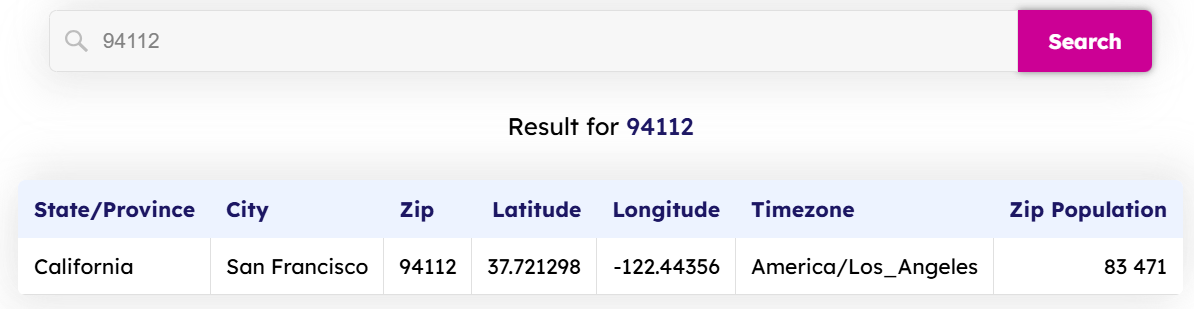
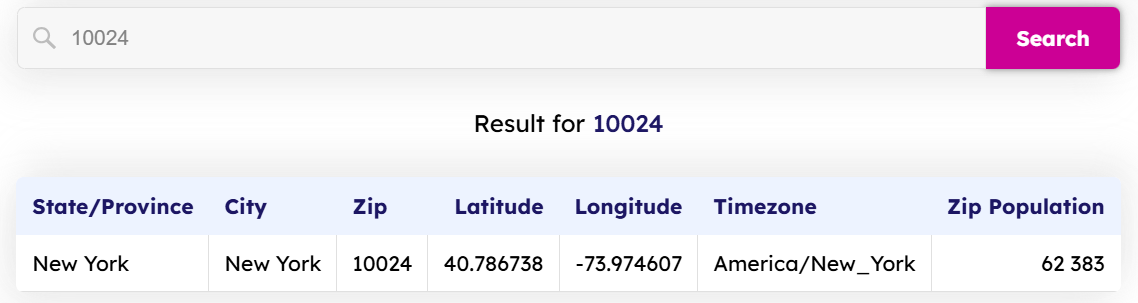
Now, we can follow a few simple steps to achieve our objective. Organize the data by arranging the ZIP Codes and their coordinates in clearly labeled columns. Our formatted Excel table now looks like this:
| STATE/PROVINCE | CITY | zip | latitude | longtitude | timezone | zip population |
|---|---|---|---|---|---|---|
| California | San Francisco | 94112 | 37.721298 | -122.44356 | America/Los_Angeles | 83471 |
| New York | New York | 10024 | 40.786738 | -73.974607 | America/New_York | 62383 |
Step 2: Convert degrees to radians
From the attributes that are offered by the GeoPostcodes ZIP Code Lookup tool, we will only need ZIP, Latitude, and Longitude. Convert your latitude and longitude values from degrees to radians using Excel’s built-in formula: =RADIANS(degree_value). This conversion is crucial because the Haversine formula uses radians, not degrees.
| ZIP | LATITUDE | LONGTITUDE | LATITUDE (rADIANS) | LONGTITUDE (RADIANS) |
|---|---|---|---|---|
| 94112 | 37.72 | -122.44 | 0.66 | -2.14 |
| 10024 | 40.79 | -73.97 | 0.71 | -1.29 |
Now that we have our sample dataset ready, we can proceed with the calculations.
Step 3: Apply the Excel formula
Paste the Haversine formula in the cell where you want to store the results and replace the values with your data. In our example:
=ACOS(SIN(0.66)*SIN(0.71)+COS(0.66)*COS(0.71)*COS(lon2-(-2.14)))*6371
The result is 4134.08 kilometers.
Step 4: Convert units (miles/km)
Now that the calculation is complete, we can format and convert the results to the desired units: meters, kilometers, miles, or any other unit.
Limitations and accuracy considerations
Every tool has its limits, and ZIP Code distance calculations come with important caveats.
- ZIP Code centroids provide approximations of entire areas. Large rural ZIP Codes might have centroids far from where most residents live.
- These calculations represent straight-line distances, similar to drawing a line with a ruler across a map and ignoring the realities of road networks or air travel. This limitation can be mitigated by performing Network Analysis using ArcGIS, using, for example, accurate postal boundaries data from GeoPostcodes. This approach offers a more realistic and reliable alternative for modeling real-world scenarios, thereby enhancing the quality of spatial insights and decision-making.
- These calculations assume that Earth is perfectly spherical, though the difference is negligible for most business applications.
Tips for accurate calculations
Obtaining accurate distance measurements requires meticulous attention to detail and high-quality data. These practical tips will help you avoid common pitfalls and ensure reliable results in your calculations:
- Verify your coordinate sources: Not all ZIP Code databases are created equal. Cross-reference your latitude and longitude data with reputable sources to avoid errors that will compromise your entire analysis.
- Use bulk calculations for efficiency: When processing hundreds or thousands of ZIP Code pairs, set up your formulas to calculate multiple distances simultaneously. This approach saves time and reduces the risk of manual errors in repetitive tasks.
- Double-check unit conversions: Confusing miles with kilometers can significantly disrupt your calculations. Always confirm that your formulas use the appropriate Earth’s radius (in either miles or kilometers), and make sure your output matches the units you intend to use.
- Keep your database up-to-date: ZIP Codes change, merge, or become obsolete over time. When making business decisions based on these calculations, make sure that you have access to an accurate and up-to-date coordinate database.
Conclusion
While the process involves mathematical formulas and coordinate conversions, the comprehensive approach makes it accessible for any business professional.
The applications offer numerous benefits, including optimizing delivery routes and analyzing market penetration. However, remember that these calculations provide straight-line distances and rely heavily on accurate coordinate data. For businesses requiring comprehensive location intelligence, partnering with specialized data providers ensures accuracy and global coverage.
For over a decade, we have maintained the most comprehensive global location database, with highly accurate coordinates covering 247 countries. We invite you to browse our databases for free, allowing you to download a sample and start with a small dataset to familiarize yourself with the process. Then, scale up as your confidence grows.
💡 Bonus tip: If you’d like to calculate the distance between two ZIP Codes in Python check out our blog post How to calculate distance between two ZIP codes in Python.
FAQ
How does Excel calculate distances between ZIP codes?
Excel uses geographic coordinates (latitude and longitude) and the Haversine formula to compute straight-line distance — the shortest path “as the crow flies” — between two postal areas.
It does not calculate travel or driving routes.
Can Excel calculate the driving distance between ZIP codes?
No. Driving distance depends on roads, speed limits, and routing networks.
Excel cannot compute driving distances using formulas alone; these require routing APIs or specialized mapping tools.
What data do I need to calculate ZIP code distances in Excel?
You need latitude and longitude coordinates for each ZIP code.
These coordinates must be converted to radians before applying the Haversine formula.
GeoPostcodes ZIP code database provides accurate coordinates for that purpose.
Why are my Excel distance results different from Google Maps?
Excel outputs straight-line distance, which is typically shorter than driving or route-based distances that Google Maps shows.
Routing results factor in the road network, which Excel formulas do not.
How can I visualize ZIP code distances in Excel?
Excel can create basic charts (scatter plots) using coordinate data, but advanced geographic maps require external tools or integrations with GIS software.
Where can I source reliable ZIP code coordinates?
Use a comprehensive postal code database like GeoPostcodes, which aggregates accurate latitude and longitude data from +1500 authoritative sources.
How do I troubleshoot errors in my Excel distance calculations?
Check that your input coordinates are in the correct columns, confirm they have been converted to radians, and verify the formula syntax.
Input formatting is the most common source of errors.
How to calculate the distance between two cities in Excel?
To calculate the distance between two cities in Excel, you first need the latitude and longitude coordinates of each city.
Excel then applies a formula such as the Haversine formula to compute the straight-line distance between the two coordinate points.
This method measures the shortest path over the Earth’s surface and does not account for road networks or travel routes.
Can Excel make a map with ZIP codes?
Excel can display basic geographic data using charts or its built-in map visualizations, but it has limited support for ZIP code-level mapping.
While you can visualize coordinates on a scatter plot, detailed ZIP code boundaries and accurate geographic maps typically require external GIS tools or dedicated mapping software.
How to do a ZIP Code analysis in Excel?
A ZIP Code analysis in Excel usually combines postal code data with coordinates, distances, or other attributes such as population or region.
Common analyses include comparing distances between ZIP codes, grouping nearby areas, or ranking locations by proximity.
These analyses rely on accurate reference data rather than routing or travel-time calculations.