
Dynamics 365 Address Validation
Native integration
Eliminate address errors and streamline your operations
with plug-and-play ZIP code and city data

Microsoft-Ready Integration
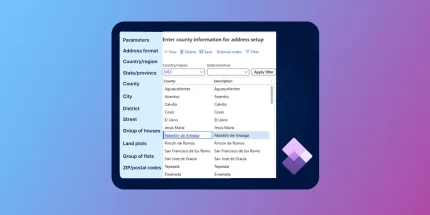
Plug-and-play database, pre-formatted to match Microsoft’s required 7-table structure.

Standardized structure
Unified global structure with standardized fields, multi-language, and consistent administrative levels.

One source of truth
A single database curated from 1,500 authoritative sources, including postal operators and official governments.
Native address data integration in Dynamics 365
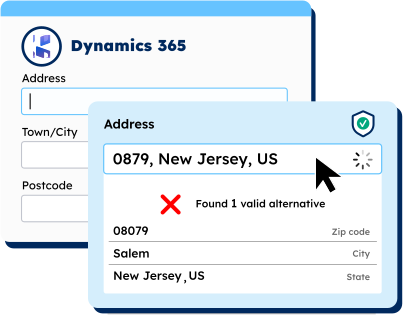
Address validation
Our native integration powers advanced address validation in Dynamics, ensuring every record is verified accurately at the point of entry.
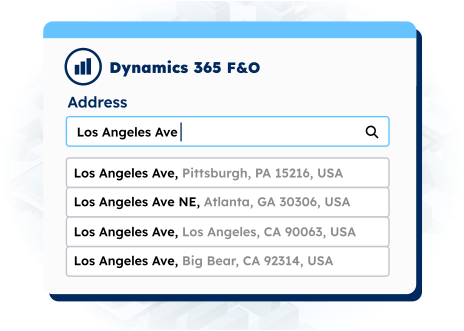
Address autocomplete
Address autocomplete automatically suggests or completes address information in your Dynamics environment, reducing the risk of manual input errors.
Challenges of address validation in Dynamics 365

sources
integration
formats
Deploy our address data in hours, not months
An expert will guide you through your Dynamics 365 implementation process. Our step-by-step Dynamics deployment guide makes it simple for your team to integrate GeoPostcodes’ data within your environment.
Trusted by industry leaders
Join more than 100 enterprise clients who trust GeoPostcodes for their location data


Anjo Grebe
Consultant


Dr. Peter Wild
Managing Partner


Kousha Mazloumi
Director of Data Science
Kousha Mazloumi
Director of Data Science


William Chao
Product Owner of Geographic Information Services


Kate Kilby
Senior Product Manager


Dave Hamm
Project Manager


Kavian Ranjbar
Data Governance Specialist


Nick Beaugié
Senior Software Engineer
Why choose GeoPostcodes for Dynamics 365?

Global coverage
Complete coverage across 247 countries, including hard-to-source geographies like China, Japan, Brazil, and Russia.

Highest quality
Built on extensive, authoritative sourcing with robust data engineering and quality control. Standardized and up-to-date.

Expert Consulting
With 15 years of experience, we guide your implementation and deliver data in the format that fits your system.
Our selection for Dynamics 365 experts





Frequently Asked Questions
You can integrate ZIP codes, city data, and customer addresses into Microsoft Dynamics 365 using structured imports, automated connectors, or custom Power Apps integrations. Proper configuration ensures complete and standardized address data, improving data entry quality and reducing customer-record inconsistencies.
For the ZIP, locality, and city fields needed for address validation, see our Postal Codes and Cities Database products.
Microsoft Dynamics uses a 7-table structure to normalize address components, including regions, cities, postal codes, and related lookups. This structure ensures that addresses follow consistent formatting across the platform, enabling clean imports and more accurate validation results. When combined with external verification APIs, it supports dependable address correction and high-quality contact data.
For structured, normalized address tables, explore the Postal Codes and Streets Database data models.
Yes. Many organizations extend Dynamics 365 forms with autocomplete or address prediction to speed up data entry and reduce keystrokes. These solutions improve address accuracy, reduce delivery errors, and enhance the overall user experience within CRM and Power Apps interfaces.
To ensure autocomplete pulls from clean, global address sources, refer to the Streets Database and Postal Codes datasets.
Public datasets usually contain incomplete, outdated, or poorly formatted address records. When imported into Dynamics, these issues lead to failed address validation, duplicate location entries, mismatched city–ZIP relationships, and unreliable contact data. Curated and normalized datasets prevent these errors and help maintain consistent global address standards.
For an overview of how address inputs vary internationally, see International Address Formats Explained.
Deployment timelines vary based on configuration, but most integrations using verification APIs are fast and require minimal disruption. When paired with clean postal, street, and city datasets, Dynamics 365 can begin validating addresses immediately—reducing delivery problems and improving data quality from day one.
Our structured data products—such as Postal Codes and Streets—help ensure smooth and accurate API integrations.
Yes. Address validation, phone validation, and email validation can function together within Microsoft Dynamics 365 and Power Apps. When combined, they significantly improve customer data reliability by standardizing contact details and ensuring each address follows global formatting rules.
To strengthen address components inside Dynamics, explore our location datasets: