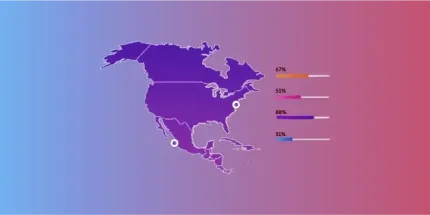
Map data visualization at global scale

Granular data to build accurate maps at any level of precision

Map visualization in your software of choice

Our self-hosted database is standardized and pre-aggregated by zip code and administrative areas, making it ready to use in your visualization tools.


GeoPostcodes-Alteryx logo
GeoPostcodes - CARTO logo
GeoPostcodes- snowflake
GeoPostcodes-ESRI-logo
GeoPostcodes - Tableau logo
GeoPostcodes-Mapbox-logo
GeoPostcodes-Qlik logo

Perform global data visualizations​

Global point and boundary coverage even in difficult geographies such as China, the UK, Russia, or Brazil.
Get up to 6 levels: A zip code layer and up to 5 administrative levels.
Data you can trust and rely on

Our advanced data pipelines capture, clean, format, and integrate new data on a weekly basis. Our proprietary data-mastering processes guarantee shape accuracy and reliable coordinates.

Trusted by Industry Leaders

Join more than 100 enterprise clients who trust GeoPostcodes for their location data

GeoPostcodes - Ecotransit logo
“GeoPostcodes’ global ZIP codes allow us to determine distances accurately. Thanks to their up-to-date database, we no longer have problems with missing locations, making our system much more efficient and reliable.”

Anjo Grebe

Consultant

“GeoPostcodes databases provide IATA codes, enhanced UNLOCODEs with port terminal data, addresses, and more – all on a global scale! This level of accuracy is essential for our mileage and CO2 emissions calculation.”
GeoPostcodes - Peter Wild CarbonCare

Dr. Peter Wild

Managing Partner

“GeoPostcodes’ Population data shows population forecasts over the next years. We can use it as a proxy to justify longer-term changes and downgrade postal code areas in terms of economic viability.”

Kousha Mazloumi

Director of Data Science

“The concept of the city receives different names or belongs to different hierarchical levels depending on the country. Using GeoPostcodes’ data gave us access to city definitions aligned with our customers’ expectations, saving us computation time.”

Kousha Mazloumi

Director of Data Science

GeoPostcodes - Logo_DB_Schenker
“The world is constantly changing. New localities and neighborhoods open up or become dispersed. It’s good to know that GeoPostcodes is keeping on top of those changes and providing us with updated information to work with.”
GeoPostcodes-GeoPostcodes-William chao picture

William Chao

Product Owner of Geographic Information Services

GeoPostcodes - Bark Logo
“The key aspect of working with GeoPostcodes has been their ability to provide customized data solutions. Their collaborative approach has made them an excellent partner in addressing our location data challenges.”

Kate Kilby

Senior Product Manager

GeoPostcodes - Opterrix-logo
“GeoPostcodes’ multi-level boundaries were perfectly aligned, enabling seamless integration with multiple secure cloud platforms. Our software can now provide more accurate visualizations for risk analysis and natural hazard monitoring.”

Dave Hamm

Project Manager

“Countries like Brazil or China are particularly strict with their customs validation. GeoPostcodes’ ZIP codes and Enhanced UNLOCODES database are aligned with national regulations, ensuring seamless transportation and compliance.”
GeoPostcodes - Kavian Ranjbar

Kavian Ranjbar

Data Governance Specialist

“If you’ve got a business where locations are a big part of it and you’re looking to avoid the large costs that can be involved in using APIs, GeoPostcodes’ on-premise database is definitely worth considering.”
GeoPostcodes-Nick Baugie

Nick Beaugié

Senior Software Engineer

Exert full control over your maps
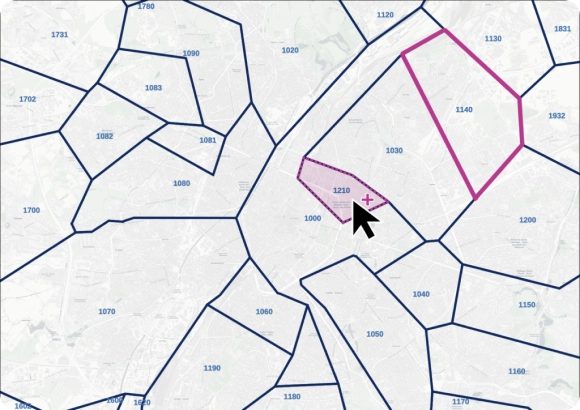
Our self-hosted data allows you to group points and polygons to form custom areas on a map easily. It’s particularly interesting for territory mapping purposes.
GeoPostcodes - Easy-customization

Rich attributes

Our data can be enriched with country-specific information, 50 years of population data and trends, 299 languages, UNLOCODE, IATA codes, and time zones.
GeoPostcodes-Boundaries rich attributes

Understand the data behind your maps

Our team combines 15 years of experience in Enterprise geodata integration with an in-depth knowledge of each country’s postal structure.​

GeoPostcodes-Data team

Why choose GeoPostcodes

Global coverage

Complete coverage across 247 countries, including hard-to-source geographies like China, Japan, Brazil, and Russia.

Highest quality

Built on extensive, authoritative sourcing with robust data engineering and quality control. Standardized and up-to-date.

Expert Consulting

With 15 years of experience, we guide your implementation and deliver data in the format that fits your system.

Check our related map data visualization articles
Frequently Asked Questions

Map data visualization displays data on maps to analyze spatial relationships and patterns.

Geographic information system (GIS) technology transforms complex data into visual formats that are easily interpreted.

For example, visualizing population density or weather patterns on a map helps understand trends and make informed decisions.

Map visualization is crucial for several reasons:

  • Enhanced Understanding: It converts complex data into visual formats, making it easier to understand

  • Pattern Identification: It reveals trends and patterns that might be missed in traditional data formats

  • Improved Decision-Making: It supports strategic planning by providing clear, concise data representations

  • Effective Communication: Maps communicate information visually, making it accessible to a wider audience

For instance, businesses use map visualization for market analysis and urban planners for infrastructure development.

Using map visualization in Tableau involves these steps:

  1. Connect Your Data: Import data into Tableau, ensuring it includes geographic fields like city names or coordinates

  2. Create the Map: Drag geographic fields to the “Rows” and “Columns” shelves to generate a map

  3. Customize the Map: Use the “Marks” card to adjust the data points’ colors, sizes, and details

  4. Filter and Highlight: Apply filters to focus on specific areas or data points and use the “Highlight” function to emphasize them

  5. Add Labels and Tooltips: Enhance the map with labels and tooltips for additional information on hover

  6. Publish and Share: Publish the final map to the Tableau Server or Tableau Public for sharing

Presenting map data effectively involves:

  1. Define the Purpose: Clearly outline the objective of your map

  2. Choose the Right Map Type: Select a map type (e.g., heat map, choropleth map) that best fits your data

  3. Prepare Your Data: Ensure data accuracy and proper geocoding

  4. Design the Map: Focus on clarity, using intuitive colors and symbols

  5. Add Labels and Legends: Provide clear labels and a legend for easy understanding

  6. Use Interactive Elements: Add zoom, pan, and hover effects if possible

  7. Include Contextual Information: Supplement the map with relevant charts or text

  8. Test and Refine: Test with a sample audience and adjust based on feedback

  9. Share Widely: Disseminate through reports, presentations, or online platforms

Interactive maps are dynamic maps that allow users to engage with the data in real time. Unlike static maps, these maps offer features like zooming, panning, and clicking on elements to retrieve more information.

They are important because they enable users to explore and analyze location data, understand spatial distribution, and interact with multiple layers of information.

This interactive nature helps make more informed decisions based on visualized geospatial data.

Interactive map tools effectively handle census data by visualizing demographic information across different geographic areas.

These tools can create various map types, such as heat maps and point maps, to represent the density and distribution of populations in a particular location.

By layering census data over a base map, users can explore patterns and trends in population dynamics, making it easier to understand and utilize this data for planning and analysis.

Geospatial data can create a custom map by integrating specific datasets relevant to the user’s needs. This data can include location data, spatial distribution, and other data from various sources.

Users can customize the map by using interactive maps and interactive map tools to display particular information, such as environmental data, traffic patterns, or business locations.

This customization allows for a tailored visualization that highlights specific insights and facilitates better decision-making.

Point maps are a type of map that uses points to represent specific data at particular geographic coordinates. These maps are particularly useful for visualizing location data such as addresses, event locations, or sensor data points.

By displaying data points on a map, users can easily see the spatial distribution of the data and identify patterns or clusters.

This visualization technique helps in understanding the geographic context and making data-driven decisions.

Heat maps are highly beneficial for representing geospatial data because they use color gradients to show the intensity of data values across a geographic area.

This type of visualization is particularly effective for highlighting areas with high or low concentrations of data points, making it easy to identify hotspots and trends.

Heat maps can visualize various data generated from social media check-ins, crime reports, or sales data, allowing users to grasp complex spatial patterns and make informed decisions quickly.


Different map types use various techniques to represent data, each serving unique purposes based on the kind of information being visualized.

For example, heat maps use color gradients to show the intensity of data values across a geographic area, making them ideal for highlighting hotspots and trends.

Point maps, on the other hand, use individual points to represent data at precise geographic coordinates. This method is useful for visualizing the distribution of locations such as stores, events, or sensor data.

Choropleth maps color-code predefined geographic areas to indicate different values or levels, and they are often used for demographic or statistical data representation.